> ## Documentation Index
> Fetch the complete documentation index at: https://wb-21fd5541-evaltables.mintlify.site/llms.txt
> Use this file to discover all available pages before exploring further.
# Eval Tables
> Learn how to create, compare, and visualize eval tables in W&B.
Eval Tables help you compare model outputs, scores, and metrics across runs at the individual-example level. Use an Eval Table to compare model versions or training steps, review aggregate scores, and investigate the examples behind changes in model performance.
The following image shows an Eval Table called `"validation_prediction_eval"` that compares two runs `"summer-butterfly-9"` and `"gentle-flower-8"`:
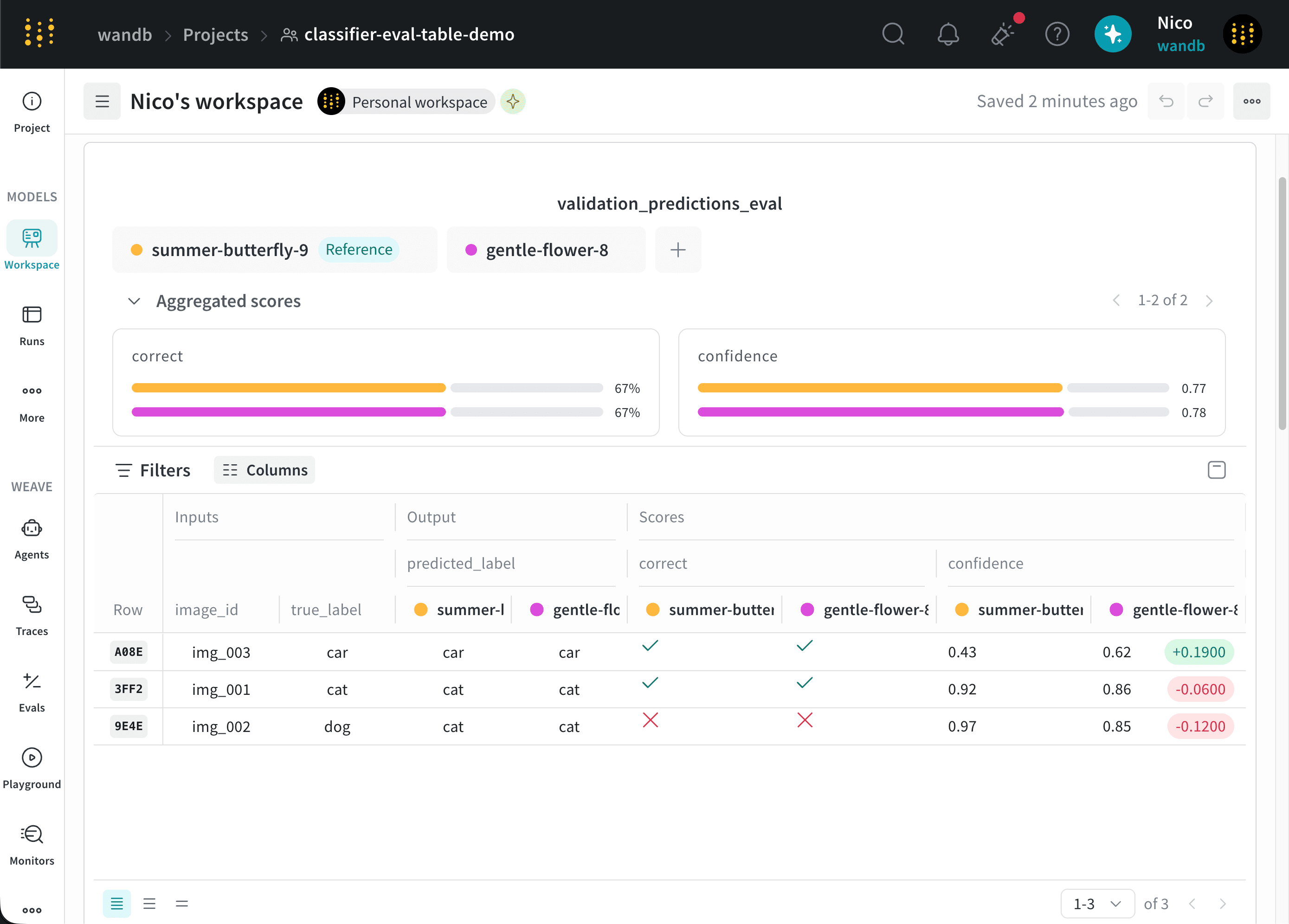 An Eval Table panel contains three sections:
1. Run comparison selector: Select the [runs that you want to compare](/models/evaltables/compare-runs).
2. Aggregate scores: Review aggregate scores for the selected runs and compare the differences between them. For more information, see [View aggregate scores](/models/evaltables/compare-runs#aggregate-scores).
3. Dataset: Compare the inputs, outputs, and scores for each example across the selected runs.
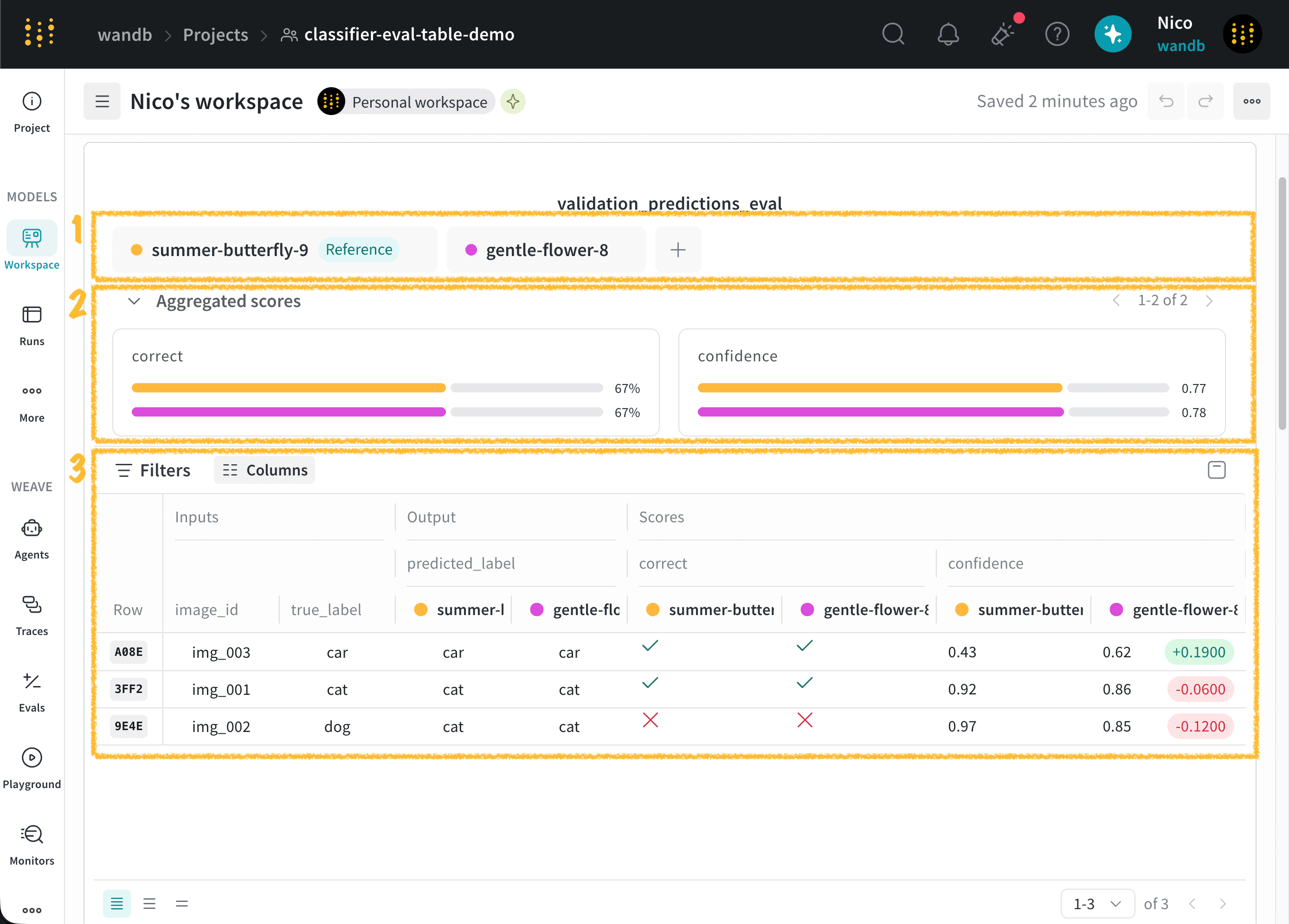
The following image highlights each section of the panel:
An Eval Table panel contains three sections:
1. Run comparison selector: Select the [runs that you want to compare](/models/evaltables/compare-runs).
2. Aggregate scores: Review aggregate scores for the selected runs and compare the differences between them. For more information, see [View aggregate scores](/models/evaltables/compare-runs#aggregate-scores).
3. Dataset: Compare the inputs, outputs, and scores for each example across the selected runs.
The following image highlights each section of the panel:
 Create an Eval Table with the `EvalTable` class from the W\&B Python SDK. You can also convert an existing [W\&B Table](/models/tables/) to an Eval Table.
Convert existing W\&B Tables to Eval Tables to improve rendering performance and access additional comparison features. For instructions, see [Convert a W\&B Table to an Eval Table](/models/evaltables/create-an-evaluation-table#convert-a-w\&b-table-to-an-eval-table).
To create your first Eval Table, see [Create an evaluation table](/models/evaltables/create-an-evaluation-table/).
Create an Eval Table with the `EvalTable` class from the W\&B Python SDK. You can also convert an existing [W\&B Table](/models/tables/) to an Eval Table.
Convert existing W\&B Tables to Eval Tables to improve rendering performance and access additional comparison features. For instructions, see [Convert a W\&B Table to an Eval Table](/models/evaltables/create-an-evaluation-table#convert-a-w\&b-table-to-an-eval-table).
To create your first Eval Table, see [Create an evaluation table](/models/evaltables/create-an-evaluation-table/).