> ## Documentation Index
> Fetch the complete documentation index at: https://wb-21fd5541-evaltables.mintlify.site/llms.txt
> Use this file to discover all available pages before exploring further.
# Hugging Face AutoTrain
> Use W&B experiment tracking with Hugging Face AutoTrain for no-code model training with a single CLI parameter.
[Hugging Face AutoTrain](https://huggingface.co/docs/autotrain/index) is a no-code tool for training models for Natural Language Processing (NLP), Computer Vision (CV), Speech, and Tabular tasks.
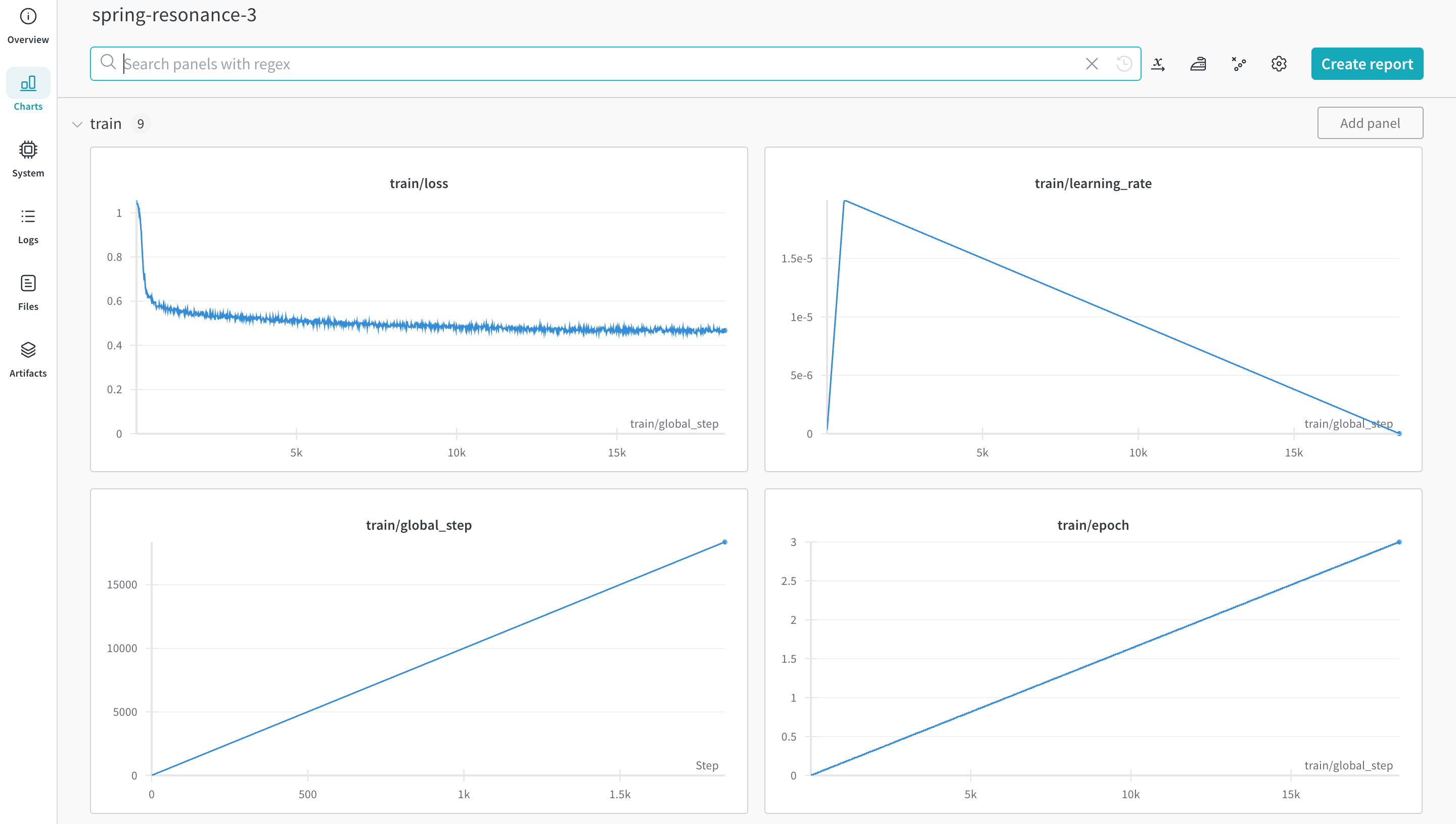
Hugging Face AutoTrain integrates directly with W\&B for experiment tracking and config management. You only need a single parameter in the CLI command for your experiments.
This page shows you how to enable W\&B experiment tracking when you train a model with Hugging Face AutoTrain. You can capture metrics and configuration for every run without writing additional code. This page is for users who are already familiar with AutoTrain and want to add observability to their training workflows.
 ## Install prerequisites
Before you can train a model and log results to W\&B, install the AutoTrain CLI and the W\&B client library. Install `autotrain-advanced` and `wandb`.
```shell theme={null}
pip install --upgrade autotrain-advanced wandb
```
```notebook theme={null}
!pip install --upgrade autotrain-advanced wandb
```
To demonstrate these changes, this page fine-tunes an LLM on a math dataset and evaluates `pass@1` on the [GSM8k Benchmarks](https://github.com/openai/grade-school-math).
## Prepare the dataset
Before training, prepare your dataset so it matches the format AutoTrain expects. Hugging Face AutoTrain expects your CSV custom dataset to have a specific format to work properly.
Your training file must contain a `text` column, which the training uses. The data in the `text` column must conform to the `### Human: Question?### Assistant: Answer.` format. Review an example in [`timdettmers/openassistant-guanaco`](https://huggingface.co/datasets/timdettmers/openassistant-guanaco).
However, the [MetaMathQA dataset](https://huggingface.co/datasets/meta-math/MetaMathQA) includes the columns `query`, `response`, and `type`. First, pre-process this dataset. Remove the `type` column and combine the contents of the `query` and `response` columns into a new `text` column in the `### Human: Query?### Assistant: Response.` format. Training uses the resulting dataset, [`rishiraj/guanaco-style-metamath`](https://huggingface.co/datasets/rishiraj/guanaco-style-metamath).
## Train using `autotrain`
With your environment and dataset ready, you can now start training. Start training with the `autotrain` advanced from the command line or a notebook. Use the `--log` argument, or use `--log wandb` to log your results to a [run](/models/runs/). The `--log wandb` argument enables the W\&B integration for this run.
Replace `` with your Hugging Face access token and `` with the target repository address (for example, `your-username/your-repo`).
```shell theme={null}
autotrain llm \
--train \
--model HuggingFaceH4/zephyr-7b-alpha \
--project-name zephyr-math \
--log wandb \
--data-path data/ \
--text-column text \
--lr 2e-5 \
--batch-size 4 \
--epochs 3 \
--block-size 1024 \
--warmup-ratio 0.03 \
--lora-r 16 \
--lora-alpha 32 \
--lora-dropout 0.05 \
--weight-decay 0.0 \
--gradient-accumulation 4 \
--logging_steps 10 \
--fp16 \
--use-peft \
--use-int4 \
--merge-adapter \
--push-to-hub \
--token \
--repo-id
```
```notebook theme={null}
# Set hyperparameters
learning_rate = 2e-5
num_epochs = 3
batch_size = 4
block_size = 1024
trainer = "sft"
warmup_ratio = 0.03
weight_decay = 0.
gradient_accumulation = 4
lora_r = 16
lora_alpha = 32
lora_dropout = 0.05
logging_steps = 10
# Run training
!autotrain llm \
--train \
--model "HuggingFaceH4/zephyr-7b-alpha" \
--project-name "zephyr-math" \
--log "wandb" \
--data-path data/ \
--text-column text \
--lr str(learning_rate) \
--batch-size str(batch_size) \
--epochs str(num_epochs) \
--block-size str(block_size) \
--warmup-ratio str(warmup_ratio) \
--lora-r str(lora_r) \
--lora-alpha str(lora_alpha) \
--lora-dropout str(lora_dropout) \
--weight-decay str(weight_decay) \
--gradient-accumulation str(gradient_accumulation) \
--logging-steps str(logging_steps) \
--fp16 \
--use-peft \
--use-int4 \
--merge-adapter \
--push-to-hub \
--token str(hf_token) \
--repo-id "rishiraj/zephyr-math"
```
## Install prerequisites
Before you can train a model and log results to W\&B, install the AutoTrain CLI and the W\&B client library. Install `autotrain-advanced` and `wandb`.
```shell theme={null}
pip install --upgrade autotrain-advanced wandb
```
```notebook theme={null}
!pip install --upgrade autotrain-advanced wandb
```
To demonstrate these changes, this page fine-tunes an LLM on a math dataset and evaluates `pass@1` on the [GSM8k Benchmarks](https://github.com/openai/grade-school-math).
## Prepare the dataset
Before training, prepare your dataset so it matches the format AutoTrain expects. Hugging Face AutoTrain expects your CSV custom dataset to have a specific format to work properly.
Your training file must contain a `text` column, which the training uses. The data in the `text` column must conform to the `### Human: Question?### Assistant: Answer.` format. Review an example in [`timdettmers/openassistant-guanaco`](https://huggingface.co/datasets/timdettmers/openassistant-guanaco).
However, the [MetaMathQA dataset](https://huggingface.co/datasets/meta-math/MetaMathQA) includes the columns `query`, `response`, and `type`. First, pre-process this dataset. Remove the `type` column and combine the contents of the `query` and `response` columns into a new `text` column in the `### Human: Query?### Assistant: Response.` format. Training uses the resulting dataset, [`rishiraj/guanaco-style-metamath`](https://huggingface.co/datasets/rishiraj/guanaco-style-metamath).
## Train using `autotrain`
With your environment and dataset ready, you can now start training. Start training with the `autotrain` advanced from the command line or a notebook. Use the `--log` argument, or use `--log wandb` to log your results to a [run](/models/runs/). The `--log wandb` argument enables the W\&B integration for this run.
Replace `` with your Hugging Face access token and `` with the target repository address (for example, `your-username/your-repo`).
```shell theme={null}
autotrain llm \
--train \
--model HuggingFaceH4/zephyr-7b-alpha \
--project-name zephyr-math \
--log wandb \
--data-path data/ \
--text-column text \
--lr 2e-5 \
--batch-size 4 \
--epochs 3 \
--block-size 1024 \
--warmup-ratio 0.03 \
--lora-r 16 \
--lora-alpha 32 \
--lora-dropout 0.05 \
--weight-decay 0.0 \
--gradient-accumulation 4 \
--logging_steps 10 \
--fp16 \
--use-peft \
--use-int4 \
--merge-adapter \
--push-to-hub \
--token \
--repo-id
```
```notebook theme={null}
# Set hyperparameters
learning_rate = 2e-5
num_epochs = 3
batch_size = 4
block_size = 1024
trainer = "sft"
warmup_ratio = 0.03
weight_decay = 0.
gradient_accumulation = 4
lora_r = 16
lora_alpha = 32
lora_dropout = 0.05
logging_steps = 10
# Run training
!autotrain llm \
--train \
--model "HuggingFaceH4/zephyr-7b-alpha" \
--project-name "zephyr-math" \
--log "wandb" \
--data-path data/ \
--text-column text \
--lr str(learning_rate) \
--batch-size str(batch_size) \
--epochs str(num_epochs) \
--block-size str(block_size) \
--warmup-ratio str(warmup_ratio) \
--lora-r str(lora_r) \
--lora-alpha str(lora_alpha) \
--lora-dropout str(lora_dropout) \
--weight-decay str(weight_decay) \
--gradient-accumulation str(gradient_accumulation) \
--logging-steps str(logging_steps) \
--fp16 \
--use-peft \
--use-int4 \
--merge-adapter \
--push-to-hub \
--token str(hf_token) \
--repo-id "rishiraj/zephyr-math"
```
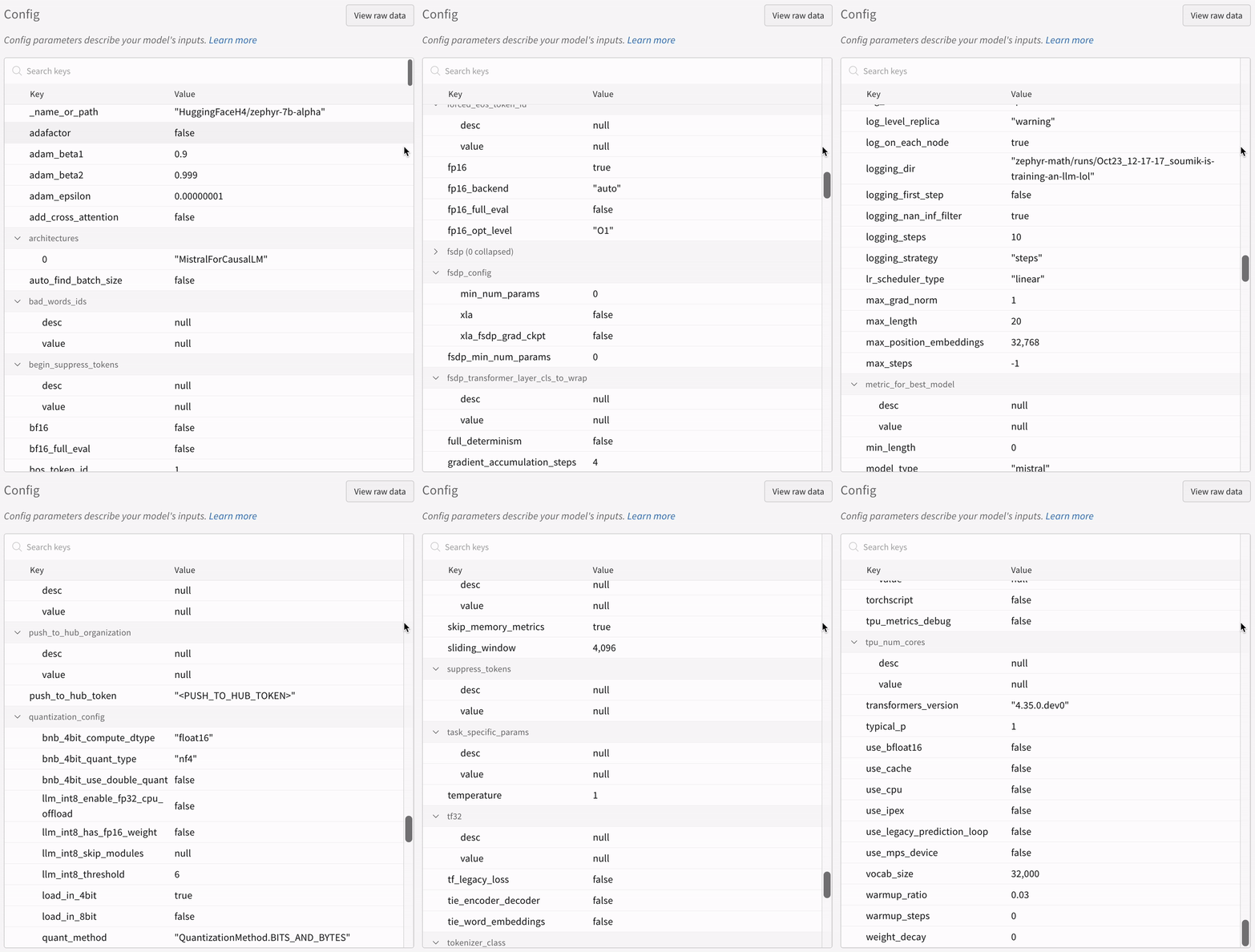 After training starts, AutoTrain logs your run's metrics and configuration to W\&B, where you can review them alongside any other runs in your project.
## More resources
* [AutoTrain Advanced now supports Experiment Tracking](https://huggingface.co/blog/rishiraj/log-autotrain) by [Rishiraj Acharya](https://huggingface.co/rishiraj).
* [Hugging Face AutoTrain Docs](https://huggingface.co/docs/autotrain/index)
After training starts, AutoTrain logs your run's metrics and configuration to W\&B, where you can review them alongside any other runs in your project.
## More resources
* [AutoTrain Advanced now supports Experiment Tracking](https://huggingface.co/blog/rishiraj/log-autotrain) by [Rishiraj Acharya](https://huggingface.co/rishiraj).
* [Hugging Face AutoTrain Docs](https://huggingface.co/docs/autotrain/index)